LinLearn
Browser-Native Linux & DevOps Training
Browser-native Linux and DevOps training platform featuring an interactive Linux terminal, incident simulation, learning missions, command assistance, cognitive mastery tracking, and XP progress.
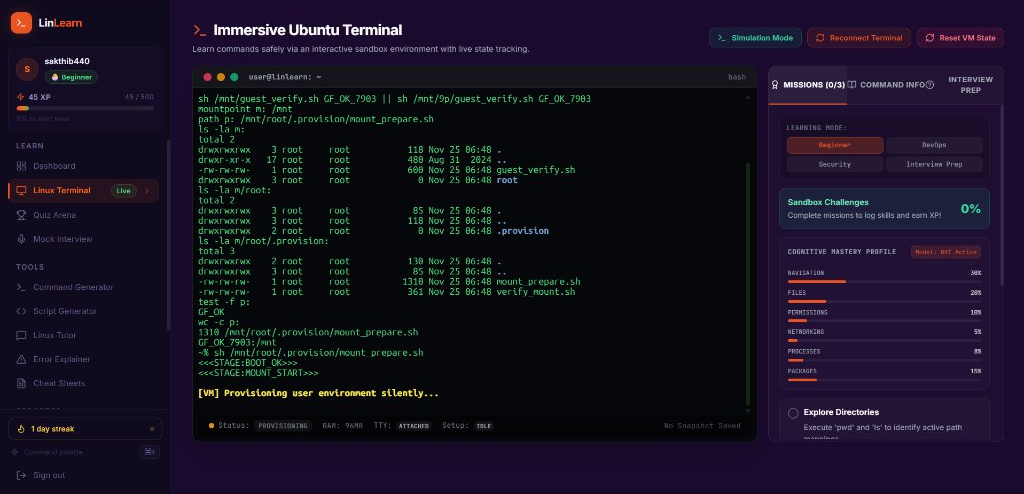
What LinLearn Does
LinLearn is a browser-native Linux and DevOps training platform built around an interactive Linux terminal, Simulation Mode (distinct from a fully operational local VM while provisioning), incident simulations, learning missions, command assistance, cognitive mastery tracking (BKT model), and XP/streak learning progress—backed by Next.js, TypeScript, v86 WebAssembly, IndexedDB, Supabase Auth/RLS, Redis rate limiting, and Groq AI.
Why I Chose This Project
I built LinLearn to combine practical systems education with browser-native WebAssembly virtualization and responsible AI engineering—giving learners real Linux environments without cloud VM spin-up latency while enforcing strict data isolation and usage quotas.
Learners studying Linux and DevOps often struggle to practice real troubleshooting safely without provisioning external servers, and lack guided feedback when diagnosing Nginx, Docker, or permission incidents.
Deliver an interactive x86 Linux training environment directly in the browser with persistent local state, realistic production-incident simulations, and an AI tutor protected by authentication, Row-Level Security, and rate limits.
A Next.js + TypeScript application embedding a v86 WebAssembly x86 Linux VM with IndexedDB state persistence, paired with Supabase Auth/RLS, Redis rate limiting, and Groq AI tutoring workflows.
Core Engineering Goals
- Run a full x86 Linux VM entirely in the browser using WebAssembly (v86).
- Simulate live production incidents covering Nginx, Docker, and Linux permissions.
- Provide an AI tutor for mock interviews, command generation, cheat-sheet creation, and terminal error analysis.
- Track adaptive mastery with IndexedDB persistence.
- Enforce secure authentication, Supabase Row-Level Security (RLS), Redis rate limiting, and AI usage quotas.
LinLearn Component Topology
Next.js + v86 WASM
Browser x86 Linux VM & IndexedDB
Supabase Auth & RLS
Session Security & Row-Level Isolation
Redis Guard
Rate Limiting & AI Usage Quotas
Groq AI Tutor
Incident Guidance, Commands & Interviews
Request & Data Flows
- Next.js + v86 WASMSupabase Auth & RLSAuthenticated session & mastery sync
- Next.js + v86 WASMRedis GuardRate limit & quota check
- Redis GuardGroq AI TutorAuthorized inference prompts
- Groq AI TutorNext.js + v86 WASMError analysis, commands & feedback
Tools & Frameworks
- Next.js
- TypeScript
- WebAssembly
- v86
- IndexedDB
- Supabase
- Redis
- Groq AI
What I Built
- Built the Next.js and TypeScript platform integrating a browser-native x86 Linux VM via WebAssembly (v86) and IndexedDB persistence.
- Designed live production-incident simulations (Nginx, Docker, permissions) and adaptive mastery tracking.
- Implemented AI tutor workflows with Groq AI: mock interviews, command generation, cheat-sheet creation, and terminal error analysis.
- Configured Supabase authentication, Row-Level Security, and Redis-backed rate limiting and AI usage quotas.
Key Capabilities
- Interactive Linux terminal with Simulation Mode (distinct from a fully operational VM)
- Incident simulation (Nginx, Docker, permissions)
- Learning missions & sandbox challenges
- Command assistance, cheat sheets & AI tutor
- Cognitive mastery tracking (BKT model)
- XP, streaks & learning progress
- Supabase Auth/RLS & Redis rate limiting
Engineering & Delivery Process
- 01Type-safe full-stack development in Next.js and TypeScript.
- 02Client-side VM integration with WebAssembly (v86) and IndexedDB persistence.
- 03Database access policy design with Supabase Row-Level Security and Redis quota guards.
Hard Problems Encountered
- Running a responsive x86 Linux environment inside the browser while persisting learner progress locally.
- Preventing uncontrolled LLM API consumption across interactive AI tutor and error analysis flows.
- Ensuring each learner's saved progress and session history remain strictly isolated at the database layer.
How I Solved Those Challenges
- Integrated the v86 WebAssembly emulator with IndexedDB persistence so learners can boot and resume Linux environments directly in the browser.
- Added Redis-backed rate limiting and explicit AI usage quotas before forwarding requests to Groq AI.
- Enforced Supabase Row-Level Security policies tied to authenticated user sessions.
System Visual Preview
Dashboard preview shows LinLearn in Simulation Mode during VM environment provisioning (not a completed terminal session). Live deployment is available at linlearn.vercel.app/dashboard.
Engineering Takeaways
- Integrating WebAssembly (v86) virtualization and IndexedDB persistence in a Next.js application.
- How database-enforced Row-Level Security simplifies multi-tenant authorization.
- Designing cost-aware AI applications with Redis rate limiting and explicit usage quotas.
- • Additional screenshots of the production-incident simulation views if you want them embedded.